When video streaming started gaining momentum online, the geo-restrictions that existed for traditional distribution were carried over to their streaming counterparts.
At first, it was trivial to bypass them. All one had to do was connect to a VPN server located in the country where the desired content was available and boom, the geo-restrictions were gone.
Because of that, certain streaming services, such as Netflix, started blocking VPNs.
Since then, many commercial VPNs have devised ways to get around the Netflix block. Some of them work, while others do not.
When we first tested Private Internet Access (PIA) with Netflix, back in 2020, it didn't work, and PIA didn't claim it would. That has changed: PIA now runs streaming-optimized servers and advertises them for Netflix.
So, Does Private Internet Access Support Netflix?
Yes, these days Private Internet Access does work with Netflix, as long as you use the right servers.
PIA has added servers marked as streaming-optimized to its network, in several countries, including the US and the UK. These are the servers PIA tells you to use for Netflix and other streaming services. Its regular servers are a different story: on those, Netflix may still detect the VPN.
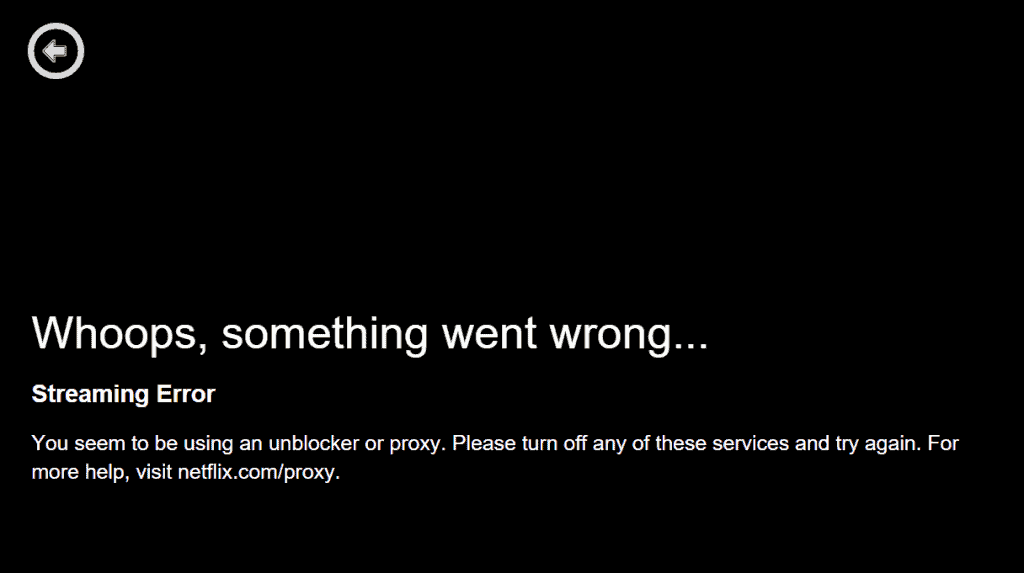
That explains what we saw in 2020, before those servers existed. I was able to access the site and log in. But when I tried playing something, I would invariably get the black error message pictured below, stating that Netflix had detected that I was using an “unblocker or a proxy”, read: VPN.
So if you tried PIA with Netflix a few years ago and gave up, it's worth another try on a streaming-optimized server.
Keep in mind that no VPN can guarantee Netflix access. It's a cat-and-mouse game (more on that below), and any server that works today can be blocked tomorrow.
Some other VPN services that we’ve tested with Netflix are:
How to Watch Netflix With PIA
- Install the PIA app on the device you watch on (computer, phone, tablet, Fire TV or Android TV).
- Open the list of locations and pick a server marked as streaming-optimized, in the country whose Netflix library you want.
- Connect, then open Netflix (or restart the Netflix app if it was already open, so it doesn't reuse your old connection).
- If you get the “unblocker or proxy” error, disconnect and try another streaming-optimized server, or contact PIA's support: they can tell you which servers currently work.
The Netflix VPN Ban
January 2016 is when Netflix started blocking VPNs. Many VPN users were understandably disappointed by the move.
But, to be fair to Netflix, its licensing deals oblige it to enforce the geo-restrictions content creators and distributors impose on their content.
They probably didn’t need to take such an extreme step. But that’s the decision they made. It does “fix” their problem in one fell swoop.
Since then, dozens, if not more, of VPN providers began looking for ways of unblocking Netflix.
How Does Netflix Ban VPNs?

There are different techniques used to detect VPN use. And they all employ traffic analysis in some shape or form. Let’s look at a few.
Predictable Patterns
Encrypting your traffic is a VPN’s main purpose.
But in order to achieve this, certain operations need to be performed, such as key negotiation (and re-negotiation) and key exchanges.
And it just so happens that these operations are performed at fixed intervals and generate the same number of data packets in the same sequence, every time.
This pattern is highly predictable and can be used to infer VPN use.
Fully Encrypted Traffic
Another way VPNs can be detected is, ironically, also what makes them secure: fully encrypted traffic.
Normally, when you browse the Web without a VPN, upon accessing a site, your browser starts downloading resources from the server you’re connected to.
Most of these resources are encrypted these days, such as your main connection to the website you queried. But some elements, or the lookups your device makes to find them, can still travel unencrypted.
This contrasts with using a VPN, where every single packet coming out of your device is fully encrypted. And it is this contrast that can be used to infer VPN use.
Ports Used
Most VPN protocols have a default port assignment, which they use to create the VPN tunnel.
Here’s a list of the default ports of the three most secure VPN protocols:
- IKEv2 – ports 500, 4500
- OpenVPN – port 1194
- WireGuard – port 51820
Looking at the port your traffic is coming from can be a giveaway that you’re using a VPN.
This is admittedly a weaker detection method. It’s weaker because OpenVPN and WireGuard are capable of running on arbitrary ports. But IKEv2 cannot.
PIA's apps let you pick WireGuard or OpenVPN, and for OpenVPN you can choose a different port. That's worth a try over IKEv2 if a server won't play Netflix.
IP Address Identification
Your public IP address is always visible to any website or online service you connect to – a VPN or not.
The difference when using a VPN is that your public IP address is replaced by the public IP address of the VPN server you’re connected to. And so the public IP address the website or service will see is the VPN server’s IP.
But VPN server IP addresses are public.
What does that mean?
It means that it’s possible to compile lists of VPN server IPs. I say “it’s possible”, but it’s not just possible, it’s real.
Once the lists are compiled, it’s a trivial matter to blacklist the IP addresses they contain. And once a server IP is blacklisted, you can forget about watching Netflix over that server.
This is very likely the main way Netflix detects VPNs. And it's why streaming-optimized servers exist: their IP addresses are managed so they stay off those lists for as long as possible.
Also bear in mind that Netflix won’t be using just one of these techniques. They will very likely use many of them together – plus a bunch of homegrown solutions they’ve (presumably) put together.
Can the Netflix VPN Ban be Bypassed?

Yes. Many VPN providers unblock Netflix, PIA now among them. Others that advertise it are NordVPN, Surfshark, and ExpressVPN.
The VPN providers which bypass the ban and enable you to access Netflix don’t want to reveal too much about how they do it. And understandably so.
They are, after all, in a cat-and-mouse game with Netflix and they don’t want to weaken their position by revealing their tactics.
However, the main way this is achieved is likely by regularly updating (changing) their server IP addresses, in order to stay ahead of the blacklisting. They probably also use arbitrary ports.
This also explains why the VPN providers that do support Netflix warn their users that a working server will eventually fail (i.e. be blacklisted).
The solution is as easy as it is obvious: switch to a different server.
Wrapping Up
So yes, Private Internet Access works with Netflix now, through its streaming-optimized servers. In 2020 it didn't, so older reviews (including our first test) no longer tell the whole story.
Stick to those servers, and switch to another one when Netflix shows its proxy error. That goes for every VPN, not only PIA.
If you'd like to compare, you may want to look at our Netflix reviews of NordVPN, Surfshark, or ExpressVPN.
And if you’d like more information on PIA, check out our Private Internet Access review.